Live on P21 v22+Built for Prophet 21 distributors

From P21 datato controlled execution.

MarginBase reads your Prophet 21 live, surfaces what to act on — supplier risk, stockouts, cost drift, Mock POs — and writes changes back. Some of those writes wait on a person. Some workflows push on their own. No spreadsheets, no nightly exports.

Connects in ~45 minYou choose what writes
app.marginbase.io/dashboard

Dashboard
Buyer's Guide
Mock PO
Replenishment
Cost Mgmt
Admin
P21 Integ.
Tue · May 25
Morning, Maria
At risk
7
suppliers
Stockout
142
items
Mock POs
14
$412k draft
Batches
3
to push
Top supplier risksLive · 5m ago
SupplierBuyerOTIF · 12wAt riskStatus
Halcyon SurgicalM. Alvarez48%34urgent
Vanguard LabworksJ. Smith62%21watch
Northbridge PharmaR. Patel83%4ok
The cost of doing nothing

Your P21 already has the answers. The problem is your team can't see them in time.

Purchasing reports live in static PDFs. Replenishment recommendations sit inside SQL. Mock POs get drafted in Excel, lost between buyers, then re-keyed into P21 by hand. The data is fine, but the workflow is the bottleneck.

MarginBase sits on top of your existing P21 install and turns those answers into a single, live workspace.

0%
of stockouts at distributors on P21 have a recommendation already in the data — buyers just never see it until it's too late.
0h
a typical buyer spends each week toggling P21 reports, spreadsheets, and emails to make purchasing decisions.
0%
avg margin lift in the first 90 days from teams that move replenishment + cost reviews into a single workspace.
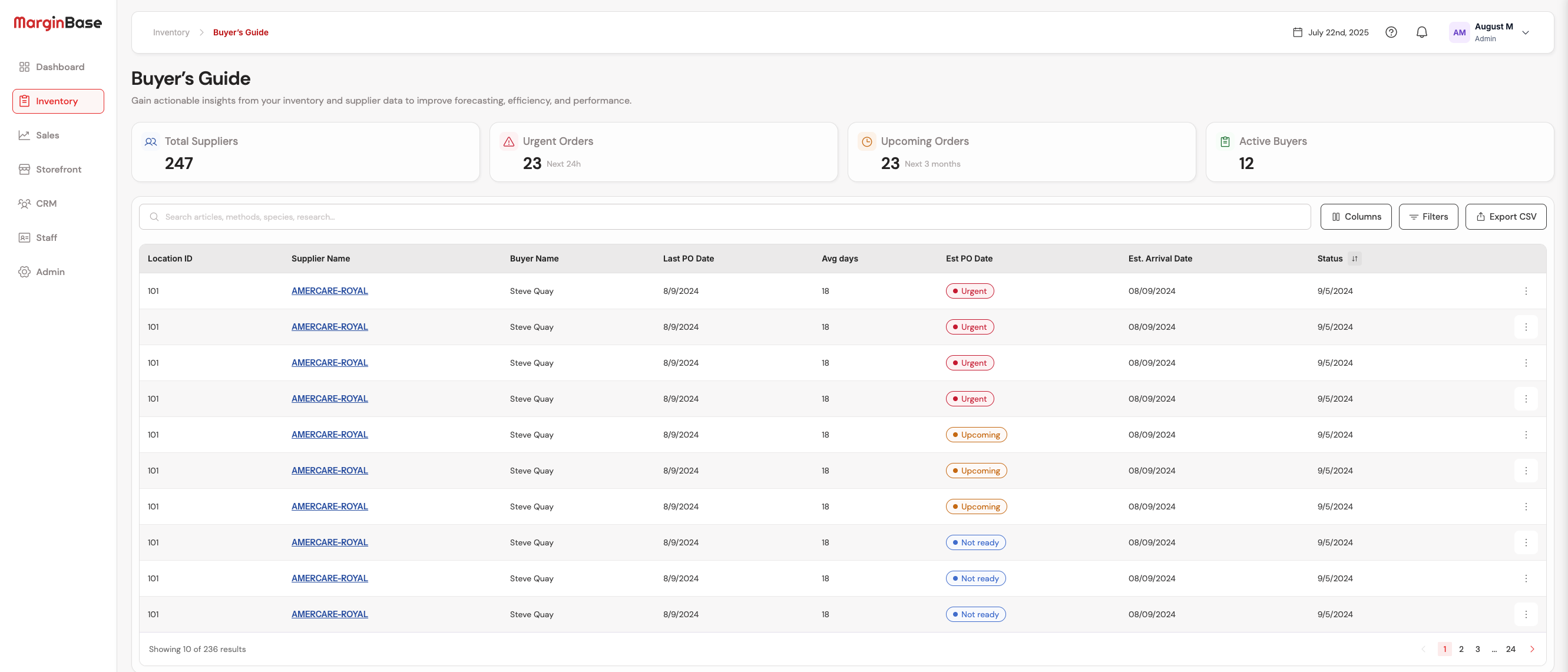
Buyer's Guide

See every supplier risk before it hits a customer.

One live table across every supplier, every DC. OTIF trend sparklines, items-at-risk, status pills — and a drawer that pulls 12 weeks of context the moment you click a row.

  • Inline OTIF + at‑risk sparklines
  • Click a row to open the supplier drawer
  • Filter by buyer, location, or status
app.marginbase.io/buyers-guide
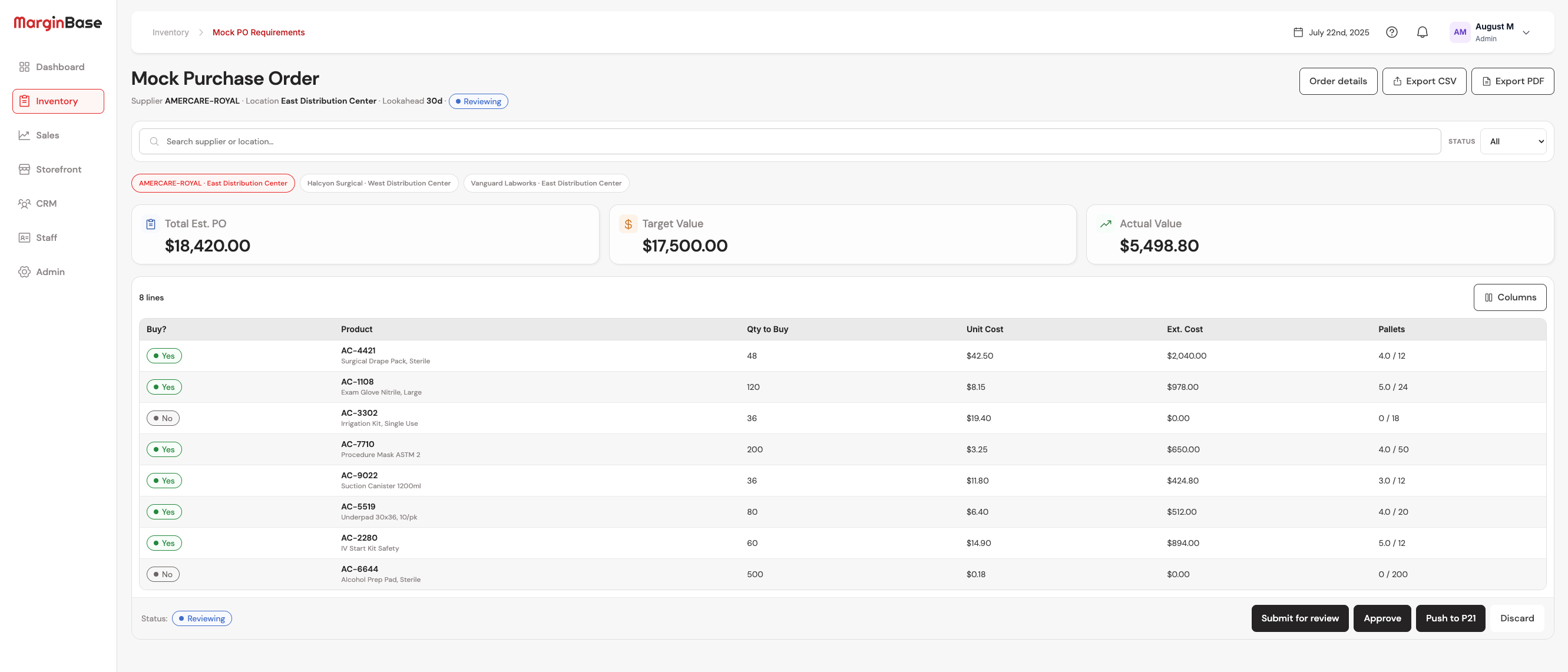
Mock PO Requirements

Build POs as a two-pane workspace, not a spreadsheet.

Left rail: every draft, status, actual-vs-target. Right pane: a clean line editor with live totals and 30-day usage sparklines per SKU. Approved POs push to P21 with one click.

  • Toggle Buy? per line
  • Submit for review, then approve
  • Push approved POs to P21
app.marginbase.io/mock-po
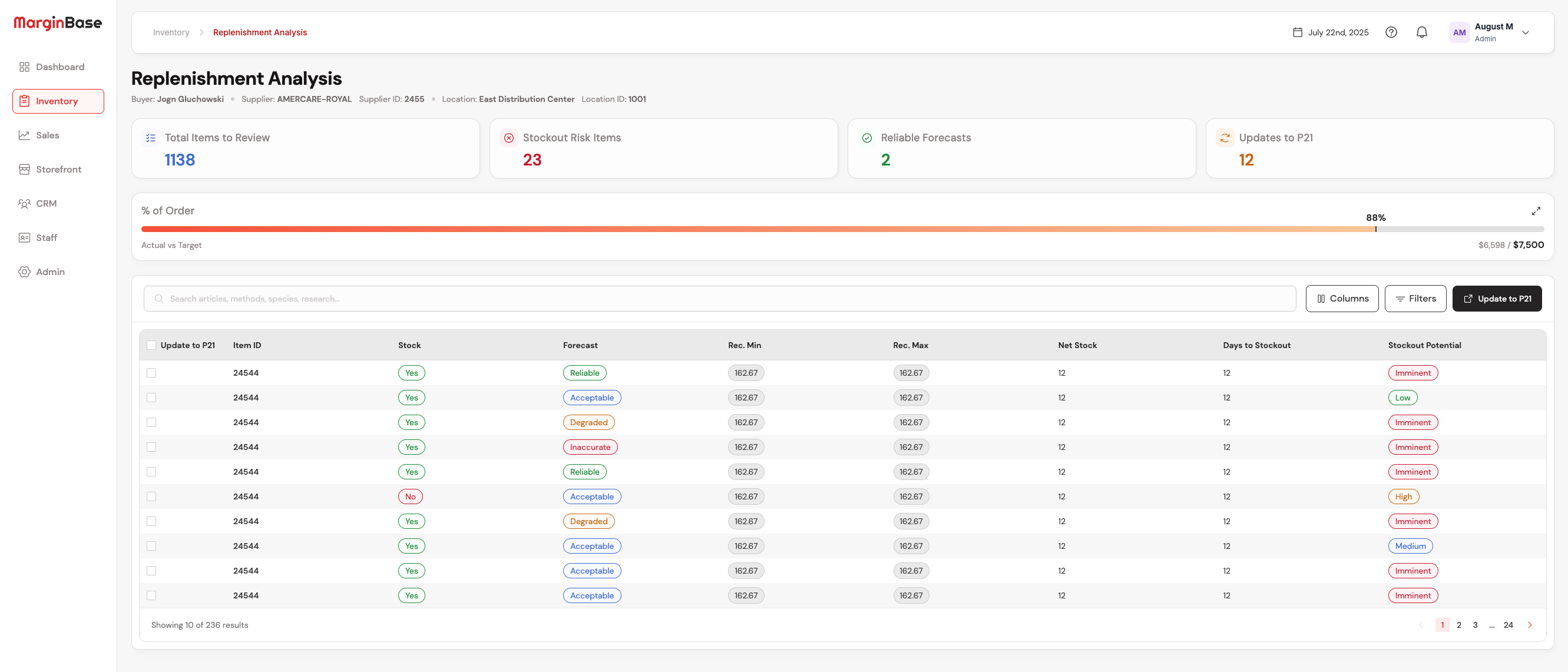
Replenishment Analysis

Forecast-driven min/max, not gut feel.

Per-SKU forecast with rec-min / rec-max bands, days-to-stockout, and a plain-English explanation of why we recommend what we recommend. Bulk-push corrected min/max back to P21 in one operation.

  • Dynamic forecast + ADU per SKU
  • Filter by ABC class or stockout risk
  • A plain-English why on every recommendation
app.marginbase.io/replenishment
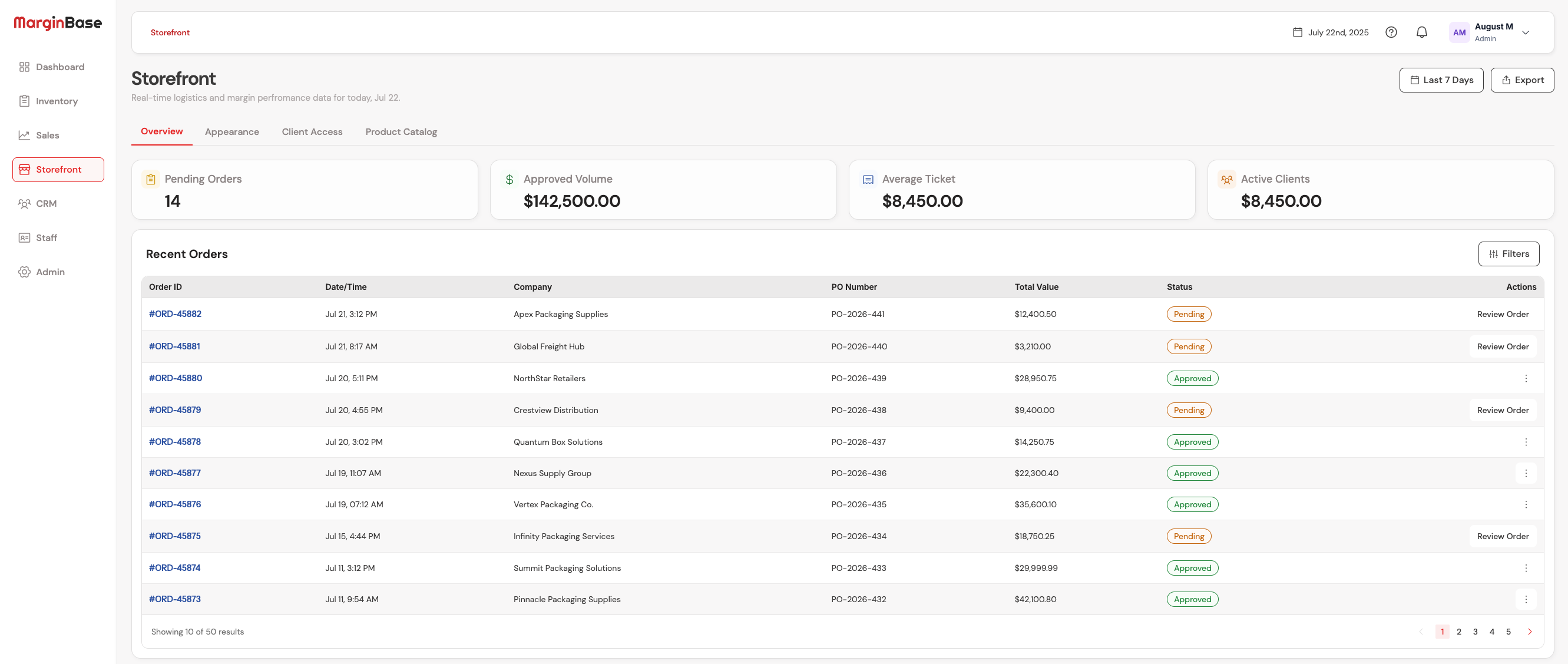
Storefront

A customer storefront on the same P21 catalog.

Included with MarginBase. Setup and hosting are billed separately when you are ready to go live.

  • Orders and catalog on live P21 items
  • Included with every MarginBase plan
  • Setup and hosting as add-on services
app.marginbase.io/storefront
How it works

Connect once. Sync continuously. Act with confidence.

MarginBase runs on top of your existing Prophet 21 install — no schema changes, no nightly exports, no drawn out process required to get the first workspace live.

STEP 01

Connect P21 — both channels

Whitelist our static IP, paste a read-only MSSQL user, optionally add P21 Web API creds for pushes. We test the handshake before anything saves.

≈ 45 min · with your DBA
STEP 02

We pull continuously

Inventory, sales history, suppliers, ABC classes — pulled on a schedule you control, mapped to MarginBase's data model. Read-only on your P21.

Initial sync ≈ 15 min
STEP 03

Your team acts in MarginBase

Buyers draft Mock POs, review replenishment, and run cost work. Some changes wait on a person. Other workflows write back to P21 on their own once you turn them on.

Live · first day
app.marginbase.io/p21-sync · Connection
Whitelist this IP on your firewall
Port 1433 (MSSQL) and 443 (REST). Single static IP, doesn't change.
52.18.94.221
Data pull · MSSQL read-only
connected
p21-sql.acme-medical.local · P21Play · svc_marginbase
Tables
138
SKUs
4,812
Last pull
2 min ago
Healthy P21 — schedule live
Pushes · P21 Web API
connected
p21.acme-medical.local/api/v3 · v23.2.4 · 99.4% success · 7d
Pricing

The whole product. Pay for who signs in.

Every plan is the full workspace. Managers stay on the invoice. Everyone else is billed only in the months they log in. A one-time setup fee gets you live. Annual billing lowers the seats and the setup.

Starter
1–3 managers
A small shop. One always-on manager is enough.
$29/ manager / mo
Always on · 1 always-on manager
$24/ used seat / moBilled only the months they sign in.
$499one-time setup
Book a demo
  • Invite the whole roster at no charge
  • Tickets open from any workflow
  • 5 hours of in-app support / month
Scale
11+ people
More buyers. The invoice still only charges who signed in.
$49/ manager / mo
Always on · 4 always-on managers
$42/ used seat / moBilled only the months they sign in.
$1,299one-time setup
Book a demo
  • Invite the whole roster at no charge
  • Tickets open from any workflow
  • 25 hours of in-app support / month
On every plan
  • Buyer's Guide, Mock PO, Replenishment, Storefront
  • Supplier Cost Management and Strategic Customer Pricing
  • Dozens of out-of-the box reports
  • Unlimited DCs and P21 companies
  • Approved changes push to P21
  • No SSO gate, no API cap, no feature lock
Billed separately

Custom reports and workflows, including changes to the standard MarginBase flows, are scoped as time-based projects. Available on every plan. Never bundled into the seat price.

Twenty-five or more people? Talk to us. Same product. We size the support hours together.
FAQ

Questions we get on the first call.

Will MarginBase write to my Prophet 21 database?

Yes. We read from a read-only MSSQL environment, then we write back to Prophet 21. Some changes wait on a person. Other workflows push automatically once you turn them on. You decide which writes need an approval and which ones can run on their own.

How fast can we go live?

Most teams are running on real P21 data within a few days. Once our bastion service has been whitelisted to access your read-only environment, it usually takes about 45 minutes with a DBA to provision the sync engine. The sync happens in the backend and users can typically start working within a few hours of the sync being started.

What if our P21 is on a custom build or older version?

MarginBase supports Prophet 21 v22+ and validates against your schema before saving credentials. For unusual installs — custom tables, regional fields, multi-company configs — we'll work with your DBA during onboarding to map the right sources.

Do you store our P21 credentials?

Encrypted at rest with your tenant key. They're write-only after save — never returned in plaintext. Rotating a key takes one click and is captured in the sensitive activity audit log.

Can I limit which buyers can push to P21?

Yes. It is a hard stop. A user can push to P21, or they cannot. There are no dollar ceilings or per-line budgets in this version.

How do seats get billed?

Invite the whole roster. Managers and admins are always on the invoice. Everyone else is billed only in the months they sign in. If Tina and Tony both use a seat, that month is two used seats. If neither signs in the next month, those seats are $0. Setup is a one-time fee to get you live. Pay annually and that fee drops with the seat rate.

Can you change a workflow or build a custom report?

Yes. That is a separate project, billed on time. It covers new reports, new workflows, and changes to the standard MarginBase flows. Seat plans do not include that work.

Is there a free trial?

We don't run a self-serve free trial because most value comes from real P21 data, and we'd rather get you connected than show you a sandbox. A demo includes a guided 14-day pilot on your data.

How does cancellation work?

Cancel any time. We export your data on request (CSV + JSON) and retain it for 90 days after cancellation in case you change your mind. We never share it.

Get started

See your Prophet 21 data come to life — in your environment, not a sandbox.

A 60-minute call with our team. We connect to your P21 on the call, walk you through Buyer's Guide + Mock PO with real SKUs, and leave you with a 14-day pilot.

Note: During the 14-day trial, P21 cannot be updated from within MarginBase.

What you'll get on the call
  • · Live connection test to your P21
  • · Buyer's Guide rendered on your suppliers
  • · Per-tier pricing tailored to your team size
  • · 14-day pilot setup — no card on file